
Microsoft Introduces Copilot Mode in Edge Browser with AI-Powered Assistance
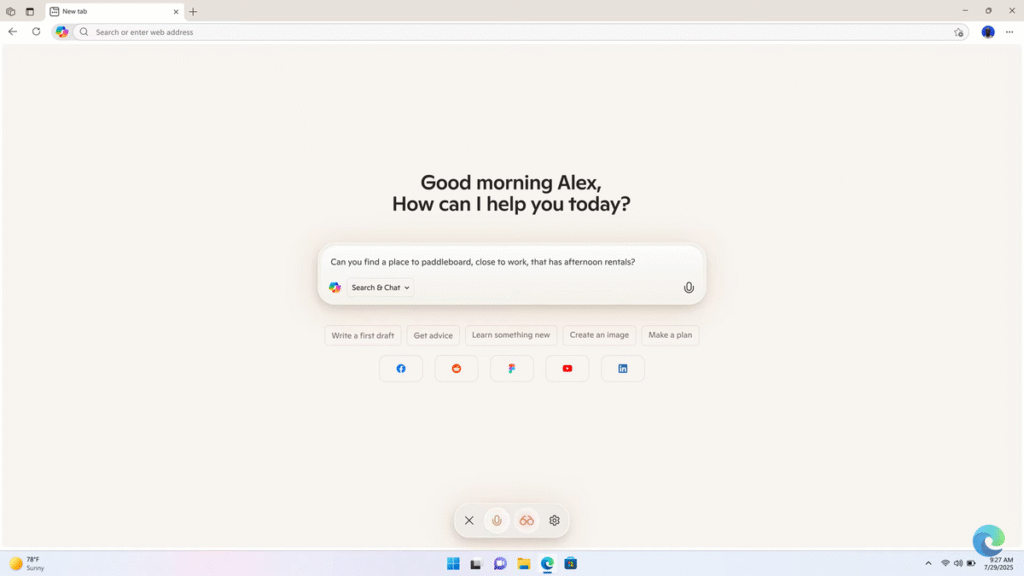
As major tech companies integrate AI into their web browsers, Microsoft is keeping pace. On Monday, July 28, the company introduced AI-powered capabilities to its Edge browser through a new feature called Copilot Mode.
Copilot Mode enables users to browse the web with the power of AI. According to Microsoft, it enhances search by providing quicker results with fewer clicks. When granted permission, Copilot can also access open tabs and browsing history to offer more tailored assistance.
The feature is designed to boost user productivity. For instance, if someone wants to find flight details, they can simply ask Copilot to identify the website with the lowest fares for specific dates—eliminating the need to switch between tabs.
Microsoft stated that Copilot Mode is still in the experimental phase. However, users can choose to set it as their default option, and it is currently accessible to any Mac or PC user with Copilot access
Once enabled, Edge users will be greeted with a new tab page where Copilot can be used to search, interact, and navigate the web. Additionally, users can request help from Copilot while browsing specific webpages. For example, Microsoft illustrates how a user can ask the AI assistant if a recipe they’re viewing can be made vegan, and Copilot will suggest suitable substitutions.
Microsoft states that Copilot can assist with a variety of tasks such as creating grocery lists, setting appointments, and generating content. The company also notes that since Copilot Mode is still in its early stages, it currently offers limited features, but its functionality will expand over time.
Multitab context
With user permission, Copilot can access all open tabs to understand ongoing browsing activity. This can be particularly useful for tasks like online research or comparing hotel and flight prices across multiple websites. While such functions are common among AI chatbots, integrating this capability directly into the browser streamlines the process of converting user intent into helpful digital assistance.
Voice assist
Copilot also supports voice input, making it especially useful for users who may be unfamiliar with AI or those with limited mobility, offering a more accessible way to make online bookings.
According to Microsoft, over time, users will be able to supply Copilot with additional information—like login details or browsing history—to manage more complex tasks such as making reservations. For now, however, the process remains somewhat manual.
Additionally, Microsoft notes that Copilot can be overlaid on any webpage without disrupting its layout. It appears in a dynamic window, allowing users to access translations or convert recipe measurements while keeping the original content in view. This makes it easier to find relevant information quickly and avoid distractions such as pop-ups or lengthy articles.
Lastly, according to Microsoft, in the future, Copilot will also suggest next actions for users to continue where they left off on a project or topic they’re exploring.
Microsoft also highlights that Copilot will access a user’s browser content only with explicit consent, and users will be clearly notified through visible indicators.